Parameterize a Fixture Instead of a Test Case with Pytest
by Josh Branchaud
In Define Sequence Of Tests With Parametrize
Decorator ↗,
I showed an approach to running a single test case multiple times across a set
of inputs. What if instead of parameterizing a single test case, I want to
parameterize a fixture? Pytest supports
this ↗.
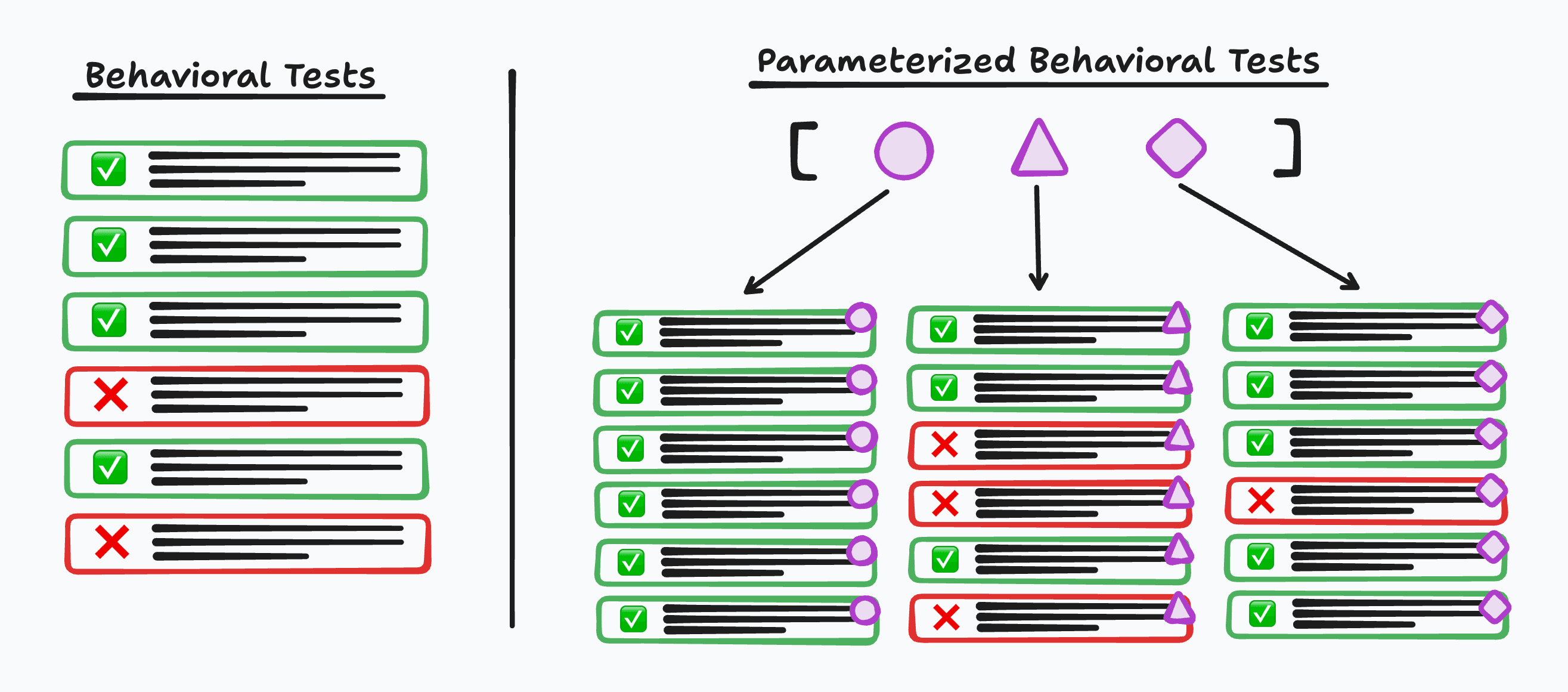
And if that fixture is autouse, then it will by extension parameterize all
test cases in that test file. This is exactly what I needed to be able to run a
set of behavioral regressions tests for each storage format supported by
py-vmt ↗.
Implementation
First, toward the top of my test file I will define a list of values I want to
test across and make them available with storage_format using the request
fixture ↗.
The name of this function is important when I get to the next part of this test
setup.
STORAGE_FORMATS = ["json", "sqlite"]

@pytest.fixture(params=STORAGE_FORMATS)
def storage_format(request) -> str:
    return request.param
The list of STORAGE_FORMATS is passed to the fixture decorator with the name
params. It is then available on request as the param property.
Pytest has a collection step where it walks the module determining what fixtures
apply to what tests. If a particular test case were to directly use
storage_format in its lists of function parameters, Pytest would pick that up.
The result would be that test case getting collected twice. Once for the value
"json" and once for "sqlite".
An autouse fixture is going to be collected for every test case in the file.
That's the point of that fixture, to be able to apply some test setup to each
individual test case.
Where it gets particularly interesting is when an autouse fixture references a
parameterized fixture like storage_format in its function parameters. This
results in a cartesian product of the collected test items -- each_test × STORAGE_FORMATS.
Per the Pytest docs on autouse
order ↗:
Autouse fixtures are assumed to apply to every test that could reference them, so they are executed before other fixtures in that scope. Fixtures that are requested by autouse fixtures effectively become autouse fixtures themselves for the tests that the real autouse fixture applies to.
With that in mind, I updated my existing use_tmp_platform_dirs fixture, which
is already autouse, to include storage_format in its function parameters.
@pytest.fixture(autouse=True)
def use_tmp_platform_dirs(tmp_path, monkeypatch, storage_format):
    data_dir = tmp_path / "data"
    config_dir = tmp_path / "config"
    data_dir.mkdir()
    config_dir.mkdir()

    # override the `config.json` a little
    (config_dir / "config.json").write_text(
        json.dumps({"storage_format": storage_format})
    )

    monkeypatch.setattr(CliContext, "get_data_dir", staticmethod(lambda: data_dir))
    monkeypatch.setattr(CliContext, "get_config_dir", staticmethod(lambda: config_dir))
There is more going on in this fixture than is necessary for this post. The key
is that by referencing storage_format, I tie this fixture to that
parameterized fixture and can use that storage_format value as part of my
setup. In this case, I use it to mock the value of a setting in the
config.json used by the CLI across all these tests.
Running the tests
When I run my test suite now, the number of tests that execute jumps up. With
the -v flag I can see the parameterization across both storage formats taking
effect. Notice the alternating [json] and [sqlite] that each test case runs
with.
❯ uv run pytest -v
========================================== test session starts ==========================================
platform darwin -- Python 3.12.12, pytest-9.0.2, pluggy-1.6.0 -- /Users/lastword/dev/jbranchaud/py-vmt/.venv/bin/python3
cachedir: .pytest_cache
rootdir: /Users/lastword/dev/jbranchaud/py-vmt
configfile: pyproject.toml
collected 73 items

tests/src/py_vmt/test_cli.py::test_no_status[json] PASSED                                         [  1%]
tests/src/py_vmt/test_cli.py::test_no_status[sqlite] PASSED                                       [  2%]
tests/src/py_vmt/test_cli.py::test_start_status_stop_flow[json] PASSED                            [  4%]
tests/src/py_vmt/test_cli.py::test_start_status_stop_flow[sqlite] FAILED                          [  5%]
tests/src/py_vmt/test_cli.py::test_start_cancel_flow[json] PASSED                                 [  6%]
tests/src/py_vmt/test_cli.py::test_start_cancel_flow[sqlite] FAILED                               [  8%]
tests/src/py_vmt/test_cli.py::test_cancel_without_active_session[json] PASSED                     [  9%]
tests/src/py_vmt/test_cli.py::test_cancel_without_active_session[sqlite] PASSED                   [ 10%]
tests/src/py_vmt/test_cli.py::test_start_at_past_time[json] PASSED                                [ 12%]
tests/src/py_vmt/test_cli.py::test_start_at_past_time[sqlite] FAILED                              [ 13%]
tests/src/py_vmt/test_cli.py::test_start_at_in_future[json] PASSED                                [ 15%]
tests/src/py_vmt/test_cli.py::test_start_at_in_future[sqlite] PASSED                              [ 16%]
tests/src/py_vmt/test_cli.py::test_start_at_with_bad_value[json] PASSED                           [ 17%]
tests/src/py_vmt/test_cli.py::test_start_at_with_bad_value[sqlite] PASSED                         [ 19%]
...
Not all my sqlite tests are passing. I still have some implementation work to
do 😅
Critique
What I find exciting about this capability in Pytest is that I can define a
single suite of high-value tests that execute the CLI like a user would via
Click's CliRunner ↗.
Then I can guard against regressions by always running them against all
supported storage format implementations.
Where it makes most sense to use this feature is when you're running a suite of core behavioral tests and you want to be able to swap out some kind of system-level component, engine, or backend. In my case, these are black-box storage engine implementations. Another example would be testing across pairs of Python versions as the example in the Pytest docs demonstrates ↗.
That said, there is more magic going on here than I generally like in either my source or test code. If I came across similar test setup in an unfamiliar project, I would have to be really paying attention to notice the subtle testing matrix that is being created. Pytest fixtures in general are a kind of metaprogramming that provide some amount of convenience at the cost of tricky-to-understand test setup with many potential footguns.
While I think this fixture parameterization feature was justified in this case and likely the best way to achieve what I needed, I would generally avoid this feature in favor of any kind of more explicit approach.